Download Cr8te
Windows installer. Install first, then activate with your licence key.
Loading releases…
Windows will warn you — here’s how to get past it
Cr8te isn’t code-signed yet, so your browser and Windows SmartScreen flag it as an unrecognised app. Nothing is wrong with the file — compare the SHA256 above if you want to be certain.
1 · Your browser blocks the download
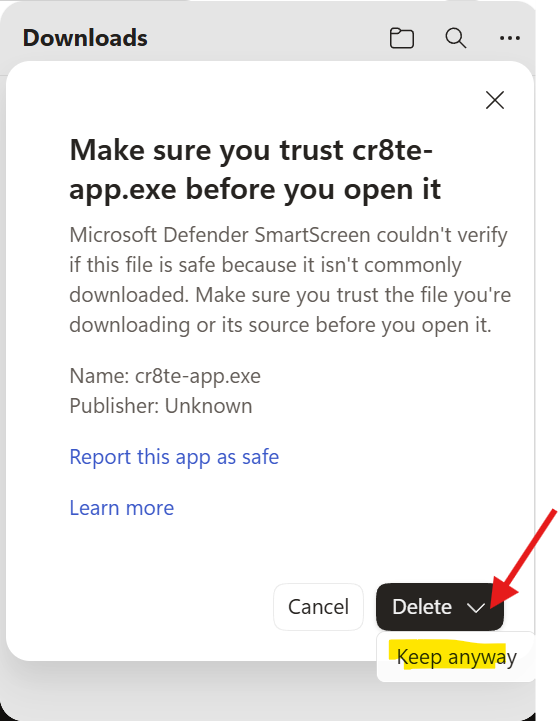
- After the download finishes, Edge shows a “Make sure you trust cr8te-app.exe before you open it” dialog.
- Click the dropdown arrow on the Delete button.
- Choose Keep anyway.
- If the download was blocked earlier, open the Downloads flyout, click … → Keep → Show more → Keep anyway.
2 · Windows SmartScreen blocks the run
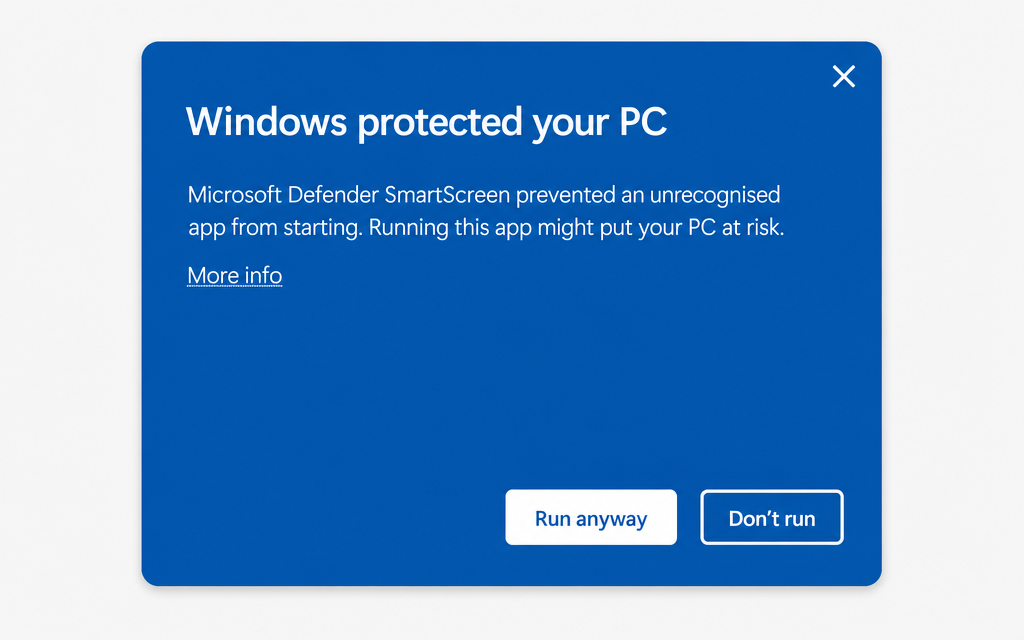
- A blue dialog appears: “Windows protected your PC”.
- Click More info — the small link under the message.
- Click Run anyway.
No “Run anyway” button? Right-click the .exe → Properties → tick Unblock at the bottom of the General tab → OK, then run it again.
These warnings fade away as a build accumulates downloads, and disappear entirely once we ship a code-signed release. Screenshots are illustrations — your exact wording may differ slightly by browser version.
Some builds are only listed for licence holders. Sign in to see them.